With meticulous application of agile testing and release-management principles, it is possible to avoid a long, end-of-release period by realizing the goal of a shippable product at the end of every iteration. Many teams have not yet attained this level of discipline, and proper use of code branching can help a team make progress. However, using branching incorrectly can have the undesired effect of slowing down rather than speeding up the team's progress.
In this article we'll describe what branches are for, and how to understand tradeoffs between branching styles. In part two, we will discuss three approaches for managing the end game of a release cycle and explain how to finish a release when you're not quite agile enough to always have ready-to-ship code.
Code Lines and Release Branches
A code line is a stream of development to which developers commit changes to be shared with other members of the team. Development starts on a single code line. As time passes, the team may decide that a section of the code needs to evolve in parallel with the main stream of development. When this happens, the team creates a branch.
A branch is simply a parallel stream of development work that starts from another code line. In effect, to branch is to make a copy of the code at a specific point in time so that the code can evolve independently. Source code management (SCM) tools can simplify the process of merging changes between two code lines by keeping track of what changed in each code line since the time of the branch. Figure 1 is an example of a simple branching diagram.
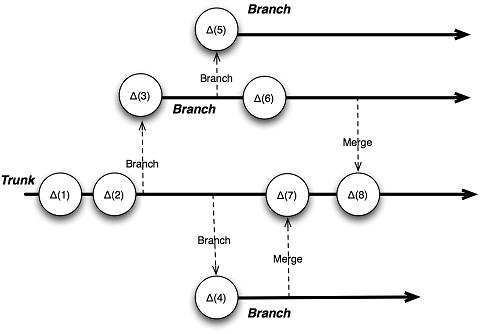 |
Figure 1: Branching
A branch has two important attributes:
- The point in time that the branch was created. This is captured by the version management tool's ability to track ancestry and is used to manage the mechanics of merging.
- The reason you branched. This is often captured with naming conventions or metadata and is used to determine how to work with the code line and the process to follow before committing changes to the code line.
While the mechanics of branching are the same, it is the reason for the branch-often associated with a policy to apply when committing code to that branch-that makes each branch special. Among the most commonly-used branch types are:
- Release branches-used to maintain code released externally
- Task branches-used to allow collaboration among team members for long-lived tasks without accidentally breaking code for others
- Private branches-used to allow an individual developer to use the features and benefits of the code while doing risky or experimental work
Figure 2 (see below) shows a common, simple code line structure: main line development. The simplest code line structure is a main line model where a team works primarily on one development line, the main line. The advantage of the main line model is that it is simple; there is a single point of integration, and it's easy to determine the current state of the project without looking across code lines. The risk with a single code line is that broken code that's committed to the main line can cause everyone problems when other developers update with broken code in the workspace. How you address the risk of this kind of breakage gets to the core of your development philosophy. You can assume that things will break and isolate work so that you can fix problems offline, or you can work towards a process where you keep your code working.
To balance the problems that could be caused by careless commits with the benefits of a single integration point, agile teams use a variation of the main line pattern called an active development line, which is structurally like the main line-a single code line-but with policies that help to ensure that the code line is always at a certain level of quality. Some of these policies include writing and running automated tests before committing changes and setting up a continuous integration process that validates the code compiles and runs all tests successfully.
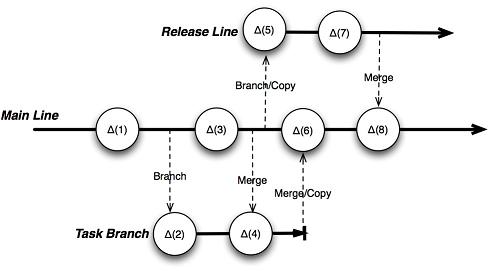 |
Firmness of Code Lines In her book Practical Perforce, Laura Wingerd describes theTofu Model for how change should flow between branches. In this model, release branches are "firmest" and task branches are least firm, with the main line in the middle. Change flows from firm code lines to softer ones, so the main line should continuously take changes from the release branch, but change should not flow the other way around. This ensures stability of the code lines. |
Figure 2: Common code line structures
There are alternatives to the agile, active development line approach, but in the end they defer problems. Your team can make more progress by helping to keep the development stream working both by exercising a reasonable amount of care before commits and also working together to immediately fix problems that might have slipped by.
Release Branches
Regardless of your development approach, it is often necessary to provide an urgent fix to code that is being used by customers without introducing additional features or functionality.
In spite of your desire to maintain shipping code, it will take time to get your team and your process to a point where you can reliably ship from the main line, so branching at or near the end of a release may be useful. This requires a parallel development stream. This development stream can evolve into a release branch that will allow you to easily fix critical issues that can't wait until the next release, so teams have processes in place to integrate these changes back into the main line by merging.
In part two of this article, I'll discuss some approaches to using your branching as a way to help you to deliver a solidly-tested product, while at the same time allowing you to begin new work while the release is being finalized.
| What's In a Merge? Version management tools can be very helpful in tracking which changes have not been merged between code lines. In some cases this is useful, especially close to the time a branch is created. There are many other situations when a literal merge isn't appropriate. Examples include:
|