In the first three parts of this series, instructor Dion Johnson taught how to write flexible and balanced automation scripts that can defend themselves against the application under test's attacks. Now that our automated test scripts are strong, they're ready for the next and final step of training. Enter Dion's dojan once more, and prepare yourself to learn offensive strikes in regards to dynamic-path handling.
We are reaching the conclusion to this technical series known as "Taekwondo-mation," and your power has definitely grown. Taekwondo-mation places a focus on four key principles:
- Flexibility--Dynamic inputting data
- Balance--Inputting dynamic data
- Self-defense--Exception handling
- Strikes--Dynamic-path handling
Your automation has become flexible in the way it inputs data, and it has become balanced in the data that it inputs. Then, in part three, your automation prowess expanded to the defense of your scripts against the offensive maneuvers of the application under test (AUT). With these first three Taekwondo-mation principles mastered, you are now ready to complete your training. I must warn you, however, that this final session is no walk in the park. It is the most technical of all of the Taekwondo-mation principles, and will therefore be the most challenging. Many have stumbled on this principle as they have sought to become Taekwondo-mation masters, but I will be rooting for your success in this endeavor.
Ever heard the phrase "The best defense is a good offense"? That is what this final principle of dynamic-path handling asserts. By creating automated tests that attack the application in whatever state it exists, the tests will be more robust and, in many respects, more effective. Dynamic-path handling is a concept that is akin to model-based test automation. Model-based test automation is an automation approach in which the tests are derived by creating and implementing a model of the functional parts of the AUT. Dynamic-path handling, while similar, is smaller in scope. Where model-based test automation normally begs for a relatively complex framework, dynamic-path handling concepts may be implemented within any framework.
Dynamic-path handling, as discussed in this column, may be implemented in two ways:
- Point-A-to-point-B transitions
- Random path changes
"Point A-to-point-B-transitions" is a concept that refers to transitions from one point in the application to another in which, at the very least, the final point is known and planned by the automator. The unknowns in this situation are the intermediate points. "Random path changes" refers to point changes that are largely random. Therefore, not even the ending state is known by the automator, but is instead chosen at random during automated test execution. For the purposes of this column, I'll only expound upon the first bullet.
To understand dynamic-path handling, let's examine a simple example of the paths that an application may follow.
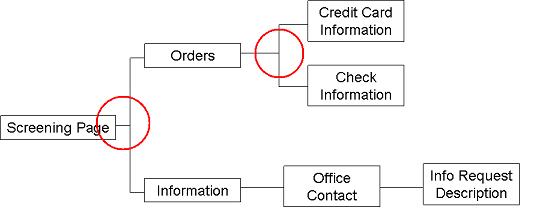 |
| Figure 1: Order application pathing |
The above figure illustrates the paths that our sample application may follow. The Screening page collects information from a user that will determine whether he gets routed to a screen that allows orders to be placed online or to a screen that provides information for contacting an organization to place an order. From the Orders screen, a user may place an order by credit card or by check online. From the Information screen, the path may go to another screen that provides detailed office contact information, then finally to a screen that provides the ability to submit a request for information via an online form.
In this sample application, dynamic-path handling may be introduced in the form of a navigation function that allows an automator to define where he currently is in the application and where he'd like to go, and then allows the automated test to dynamically determine what path to take in order to get there. One such path that may be taken is:
Screening Page à Orders à Credit Card Information
A different path may be:
Screening Page à Orders à Check Information
While it is plausible that an automated test may want to begin navigation from some point other than the Screening Page, for simplicity we will assume that the starting point is always the Screening Page. In order to appropriately implement dynamic-path handling, the following steps need to be taken:
- Build a construct that addresses each point in the possible paths. (Note: Not all paths need to be addressed. Only the paths that are deemed most important. This is your automation, so you set the rules.)
- Identify branches in the paths to be addressed.
- Assure that each point addresses the possible ending points in the path.
Step 1: Build a Construct
One simple way to build such a construct is to set up a loop that continues to check the current point against the final point and continues until the final point is reached. This may appear in a function similar to the one in figure 2.
1 | Function NavigateTo(endPoint) |
2 | currentPoint = "ScreeningPage" |
3 | Do While (currentPoint <> endpoint) |
4 | Select Case(currentPoint) |
5 | Case "ScreeningPage" |
6 |
|
7 | Case "Orders" |
8 |
|
9 | Case "CreditCardInformation" |
10 |
|
11 | Case "CheckInformation" |
12 |
|
13 | Case "Information" |
14 |
|
15 | Case "OfficeContact" |
16 |
|
17 | Case "OfficeContact" |
18 |
|
19 | Case "InfoRequestDescription" |
20 |
|
21 | End Select |
22 | Loop |
23 | End Function |
Figure 2: The construct (Note: The code used in this and other examples is Pseudocode, as opposed to actual code from a particular language, although it is worth noting that the pseudocode resembles VBScript).
This function addresses each point in the possible paths through the use of a branching construct known as a Select-Case statement. The loop ensures that the function continues to check for the current path, implements code to handle the current path, and then sets a new current path to be handled. This loop will continue until the current path becomes the ending path. The code that performs the activities just described can't be fully understood until the branches in the paths have been identified.
Step 2: Identify Branches in the Paths
The circles in figure 1 reveal the branches in the possible paths. The Screening Page may go to Orders or Information, while the Orders page may go to Credit Card Information or Check Information. These divergences in the path are where the most work will take place in the navigation function. Once these areas are identified, you may create the necessary code.
Step 3: Address Possible Ending Points
Each point--that is, each case in the Select-Case statement--must have code that performs the following activities:
- Determine whether or not the currentPoint is equal to the endPoint. If it is, then stop the loop.
- If you haven't identified the endPoint, identify it and what steps need to be taken at the currentPoint to facilitate reaching the desired endPoint.
- Identify the next point in the process and set it in the currentPoint variable, to be addressed in the next loop iteration.
Continuing with our sample, the construct from figure 2 may be updated as follows:
1 | Function NavigateTo(endPoint) |
2 | currentPoint = "ScreeningPage" |
3 | Do While (currentPoint <> endpoint) |
4 | Select Case(currentPoint) |
5 | Case "ScreeningPage" |
6 | if(endPoint = "ScreeningPage") then Exit Select |
7 |
|
8 |
for online orders, then click Continue button > |
9 | currentPoint = "Orders" |
10 | else |
11 |
for online orders, then click Continue button to |
12 | currentPoint = "Information" |
| … |
N | End Function |
Figure 3: Handling points in the path
In the interest of brevity, only the ScreeningPage portion of the function is shown in the updated figure. Notice that the first check, in line six, is to see whether the desired destination has been reached. This statement indicates that if the endPoint identified in the function call is equal to the current screen, then the Select statement can stop. The loop will also subsequently end at this point, because the currentPoint will be equal to the endPoint.
Next, every possible endPoint that may occur after the ScreeningPage is addressed. Line seven begins handling the path that begins with the Orders screen, while line ten begins handling the path that begins with the Information screen. The if condition at line seven addresses the application activity that will need to take place in order to get to any of the endPoints that may occur in the Orders path. The if condition at line ten addresses the application activity that will need to take place in order to get to any of the endPoints that may occur in the Information path.
Finally, lines nine and twelve identify what the new currentPoint will be once the appropriate application activity occurs. This will ensure that when the loop moves to its next iteration, it will go to the appropriate Case statement and perform the appropriate activity in order to move forward in the application.
These basic statements need to occur in each Case statement in the function.
Benefits of Dynamic-path Handling
There are many benefits to this approach to Dynamic-path Handling, including:
- When developing many automated tests that address many diverging paths, this type of function works as a buffer to shield your tests from numerous navigation paths, which could slow down test development and could also leave the test vulnerable to application path changes. With this type of function, navigation within a test may be handled with a statement as simple as:
NavigateTo("CheckInformation")
Note: for applications with a large number of paths, it may be best to limit the NavigateTo function to only those paths most traveled. Otherwise, the function may become too difficult to maintain.
- When combined with error handling, dynamic-path handling increases the power of automated tests, because the tests' "offensive strikes" will work off of the tests' "defensive maneuvers." This greatly increases the robustness and effectiveness of the tests.
- By introducing more advanced coding, this type of function could be set up to chose navigation paths at random, which will increase the automated tests ability to find new defects in the application
With the conclusion of this session, you are now Taekwondo-mation masters! However, I must caution you to not use this power in the wrong way. Some of the techniques may seem cool to play with, but it is important not to complicate automated tests that don't warrant such levels of complexity. I suggest that you perform an assessment of your application and test environment to determine whether or not the return obtained from implementation of these techniques exceeds the time investment involved in that implementation.
Read Training Test Automation Scripts for Dynamic Combat: Flexibility - Part I
Read Training Test Automation Scripts for Dynamic Combat: Balance - Part II
Read Training Test Automation Scripts for Dynamic Combat: Self Defense - Part III